StateGraph
StateGraph is the explicit-control-flow shape: nodes do work,
edges decide what runs next, and state flows through. Cycles
(retry-until-confidence), conditional branches, and subgraphs are
all first-class.
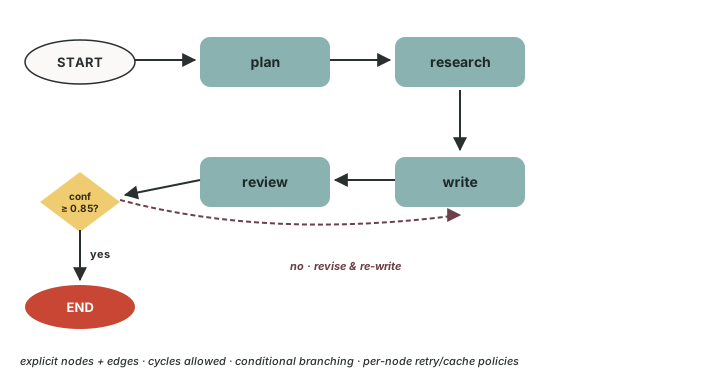
What it is
StateGraph(state_schema=...)— a builder bound to a typed state shape (your own dataclass or BaseModel).add_node(name, agent_or_callable)— a unit of work.add_edge(src, dst)— unconditional transition.add_conditional_edges(src, fn)—fn(state) → next_node_namepicks the next node dynamically.compile()— produces a runnable graph;runandrun_syncwalk like any agent.
State is a typed value object with custom reducers that control how each node's output merges into shared fields.
When to use it
- ✅ The flow has cycles — review-loop, retry, refine-until-confidence.
- ✅ You want explicit, inspectable control flow with a Mermaid diagram you can paste into a design doc.
- ✅ You need per-node retry / cache policies (different policies per node).
- ✅ Subgraphs — encapsulate a sub-workflow as a single node.
When NOT to use it
- ❌ The flow is a straight pipe with maybe a fan-out → use Composition.
- ❌ You don't know the flow at design time; agents should self-organise → use Swarm.
- ❌ A central agent should decide which expert runs next → use Orchestrator.
Code
from locus.multiagent import StateGraph, END
from pydantic import BaseModel, Field

class ResearchState(BaseModel):
    prompt: str
    research_notes: list[str] = Field(default_factory=list)
    draft: str = ""
    confidence: float = 0.0

graph = StateGraph(state_schema=ResearchState)

graph.add_node("plan", plan_agent)
graph.add_node("research", research_agent)
graph.add_node("write", write_agent)
graph.add_node("review", review_agent)

graph.add_edge("plan", "research")
graph.add_edge("research", "write")
graph.add_edge("write", "review")

graph.add_conditional_edges(
    "review",
    lambda state: END if state.confidence >= 0.85 else "research",
)

result = graph.compile().run_sync({"prompt": "Write a launch brief."})
print(result.draft)
Per-node policies
from locus.multiagent.graph import RetryPolicy, CachePolicy

graph.add_node(
    "research",
    research_agent,
    retry_policy=RetryPolicy(max_attempts=3, backoff="exponential"),
    cache_policy=CachePolicy(ttl_seconds=3600),
)
Retries handle transient failures inside the node. Cache short-circuits when an identical input has been seen recently (useful for expensive pure-function nodes).
Send / SendBatch — fan-out inside a graph
For map/reduce inside a graph use the Send primitive from
locus.core.send:
from locus.core.send import Send

def fan_out_review(state):
    return [Send("review_one", {"vendor": v}) for v in state.vendors]

graph.add_conditional_edges("plan", fan_out_review)
graph.add_node("review_one", review_one_vendor_agent)
graph.add_edge("review_one", "merge")
graph.add_node("merge", merge_reviews_agent)
Each Send becomes a parallel invocation of the target node with
the given partial state. The merge node sees all results.
Mermaid visualisation
…returns a Mermaid flowchart string you can paste into the docs or a design review.
Tutorials
tutorial_06_basic_graph.py— your first StateGraph.tutorial_07_conditional_routing.py—add_conditional_edges.tutorial_08_state_reducers.py— custom state reducers.tutorial_35_graph_advanced.py—RetryPolicy,CachePolicy, subgraphs, Mermaid output.tutorial_42_map_reduce_code_review.py—Sendfan-out / reduce in a graph.tutorial_43_supervisor_critic_loop.py—allow_cycles=True+max_iterationsfor refine-until-confidence.tutorial_46_incident_response.py— triage → parallel investigators → severity gate → page-the-human.tutorial_47_procurement_approval.py— stackedinterrupt()gates with tier routing.tutorial_48_contract_review.py— parallel reviewers +Command(goto=...)to short-circuit a loop.
Source
multiagent/graph.py
— StateGraph, Node, Edge, ConditionalEdge, RetryPolicy,
CachePolicy. Send lives in
core/send.py.
See also
- Multi-agent overview — pick a shape.
- Functional — when you'd rather use plain asyncio.
- Termination — composable stop conditions.